 hello@synaryverse.com
AI Video Production for SaaS & B2B: A Practical Guide From Product Demos to Ad Creatives

Software is hard to sell with words alone. A landing page can promise that a platform "simplifies approvals," but a buyer still wants to see the screen, the clicks, and the moment the problem goes away. That's why video carries so much weight in SaaS and B2B marketing. Wyzowl's 2026 survey found that 96% of people have watched an explainer video to learn about a product, and 63% say a short video is their preferred way to learn about one.
AI video production for SaaS makes that content quicker to build and far easier to adapt. This guide walks through the production journey step by step, from the first product demo through explainers and feature videos to ad creatives.
1. Start With the SaaS Product and Audience
Good product videos start long before anyone opens an editing tool. Pin down what the product does, who uses it, which problem it solves, and which feature deserves the spotlight. Then decide what the viewer should understand by the end, and where the video will live. A homepage, a sales deck, and a LinkedIn feed each set very different expectations. This is also where AI either earns its place or doesn't. It should serve the communication goal you've set, not decide it for you.
2. Turn Product Information Into a Video Script
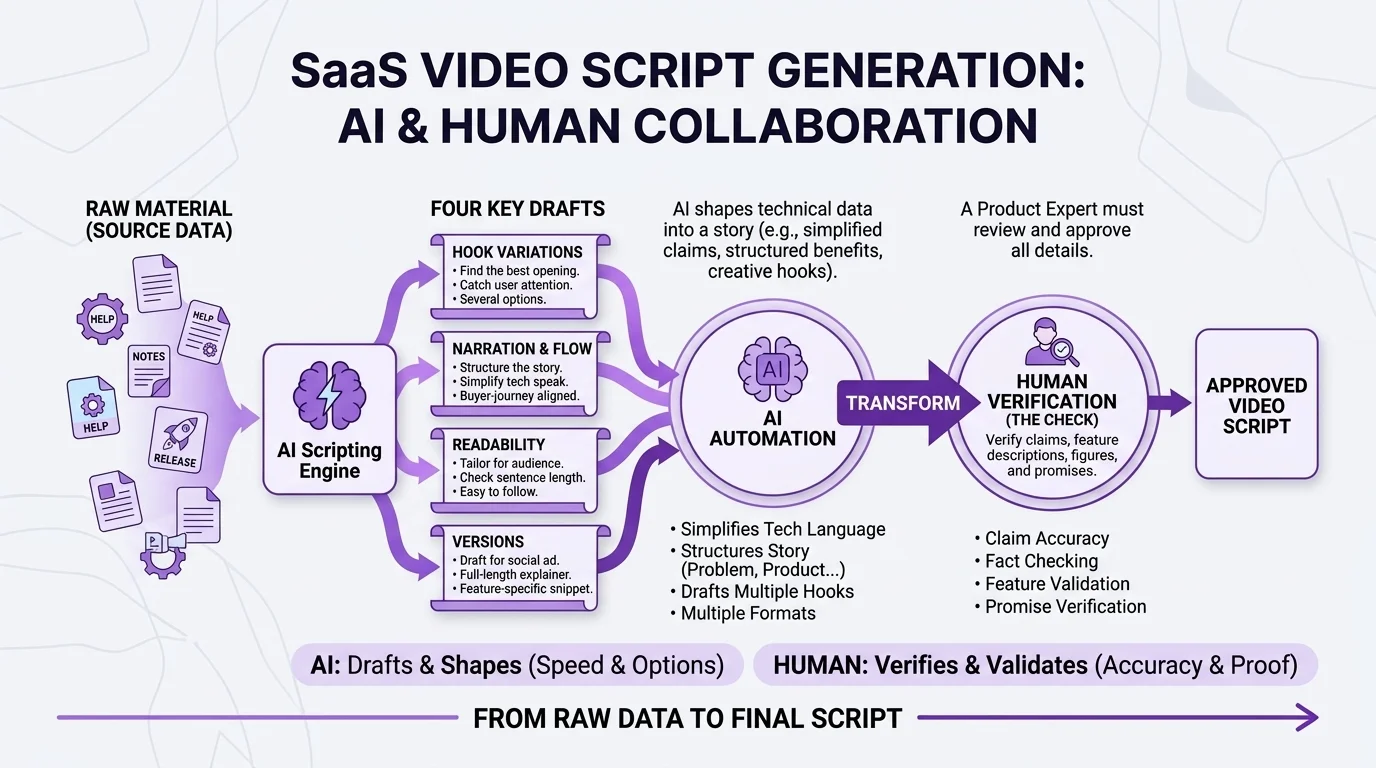
Most SaaS teams already have the raw material for a script. It sits in product documentation, help-centre articles, release notes, and the website. The work is shaping it into a story a buyer can follow:
Problem → Product → How it works → Benefit → Proof → CTA
AI script generation helps a lot at this stage. It can simplify technical language, draft several hooks, write narration, and produce versions for different readers. What it can't do is vouch for your claims, so every feature description, figure, and promise should be checked by someone who knows the product inside out.
3. Create SaaS Product Demo Videos
The product demo sits at the centre of most SaaS video libraries, and it answers one blunt question: what does this software actually do?
Buyers want to see the real product. Therefore, a strong SaaS product demo video pairs real screen recordings or UI visuals with a clear walkthrough of one workflow. AI-assisted production speeds up the layers around that footage, including voiceover, on-screen callouts, zooms, captions, and motion graphics that guide the eye to the right button at the right moment.
4. Build SaaS Explainer Videos
Demos and explainers often get lumped together, but they do different jobs. A demo shows how the product works. A SaaS explainer video helps the viewer understand what the product is, which problem it solves, and why that matters to them.
Explainers lean more on story and less on clicks, which makes them a natural fit for homepages, landing pages, sales presentations, product education, and customer onboarding.
5. Turn Features Into Product and Launch Videos
SaaS products rarely stand still. Once a production setup is in place, individual features can become short, focused videos: a new feature announcement, a product update, an integration walkthrough or a use-case clip for a particular team.
Rather than briefing a fresh production for every release, product marketing can reuse the existing brand style, voice, and templates and simply swap in what's new. Communicating product development becomes a steady habit instead of a quarterly scramble.
6. Use AI-Generated Scenes to Support the Product Story
AI scene generation is most useful for the parts of a story an interface can't show: abstract ideas like data security, the business environments your customers work in, visual metaphors, and transitions that carry the viewer from one idea to the next. Generated scenes can set the context and move the narrative along, but the screens, features, and results on display should come from the real software.
7. Adapt Product Videos Into Ad Creatives
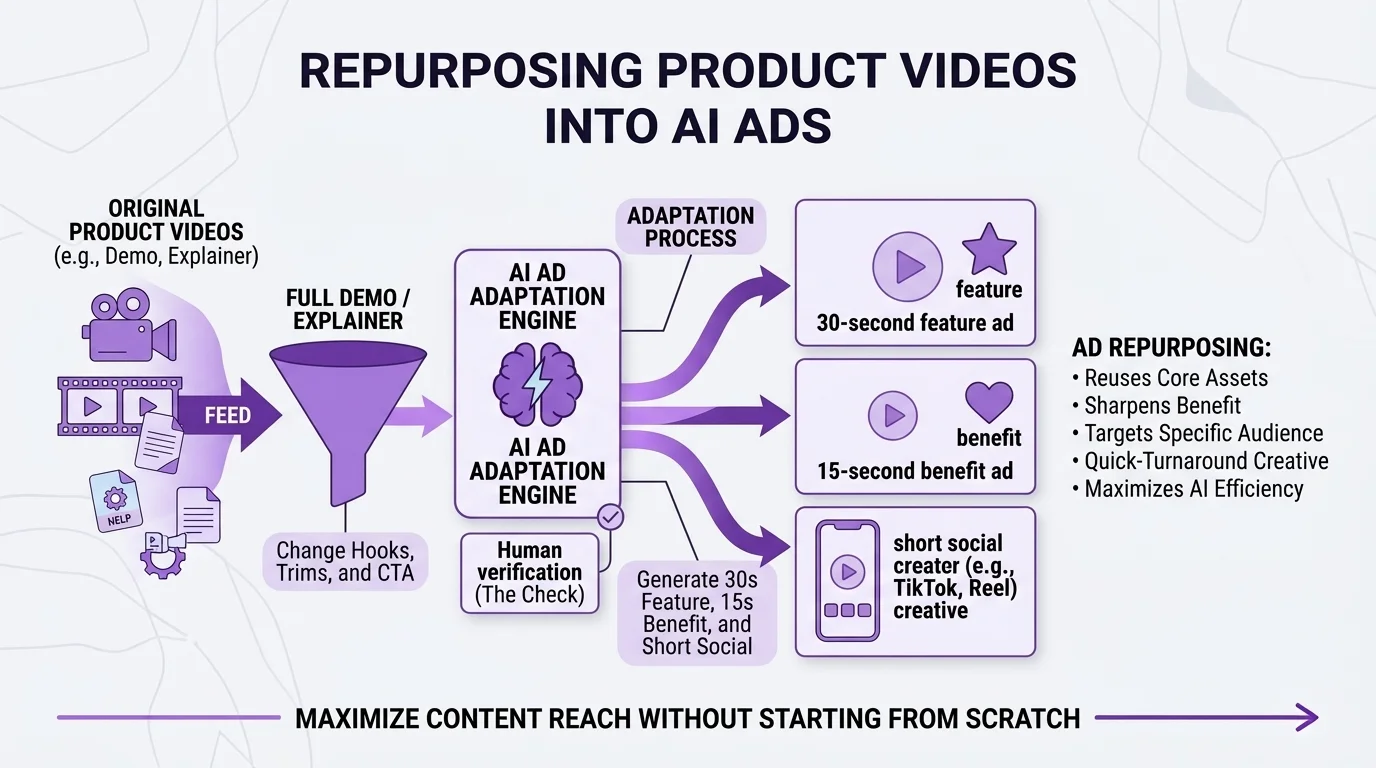
Once the demo and explainer exist, most of what an ad campaign needs is already on hand. Change the opening hook, sharpen the benefit, narrow in on one feature or one audience problem, trim the length, and rework the CTA.
One production can then feed several formats:
Full product demo → 30-second feature ad → 15-second benefit ad → short social creative
This is how product communication turns into AI video ads without starting from scratch.
8. Create Versions for Different B2B Audiences
B2B purchases rarely come down to one person. End users care about ease of use, technical teams about integrations and security, marketing teams about results, executives about outcomes, and procurement about cost and risk. A different industry shifts the message again.
AI-assisted production makes these variations realistic to produce. Keep the core product story intact and adjust four elements: the problem you open with, the feature you emphasise, the benefit you lead with, and the CTA.
9. Keep Human Creative and Product Review in the Workflow
For a SaaS or B2B brand, an inaccurate video can do more harm than no video at all. Someone close to the product needs to check UI accuracy, technical terminology, brand voice, claims, visual consistency, and any legal or compliance requirements.
A dependable process runs like this:
AI-assisted creation → human review → editing → approval.
That review loop is what separates professional AI video production from purely automated generation. AI brings the speed; the people who know the product bring the credibility.
10. Build One Production Workflow for Multiple Video Outputs
Put it all together, and the model looks like this:
Product information
Creative brief
Script
Storyboard
Product and UI visuals
AI scenes, voice, and supporting assets
Editing and motion graphics
Review
Demo, explainer, launch and ad versions
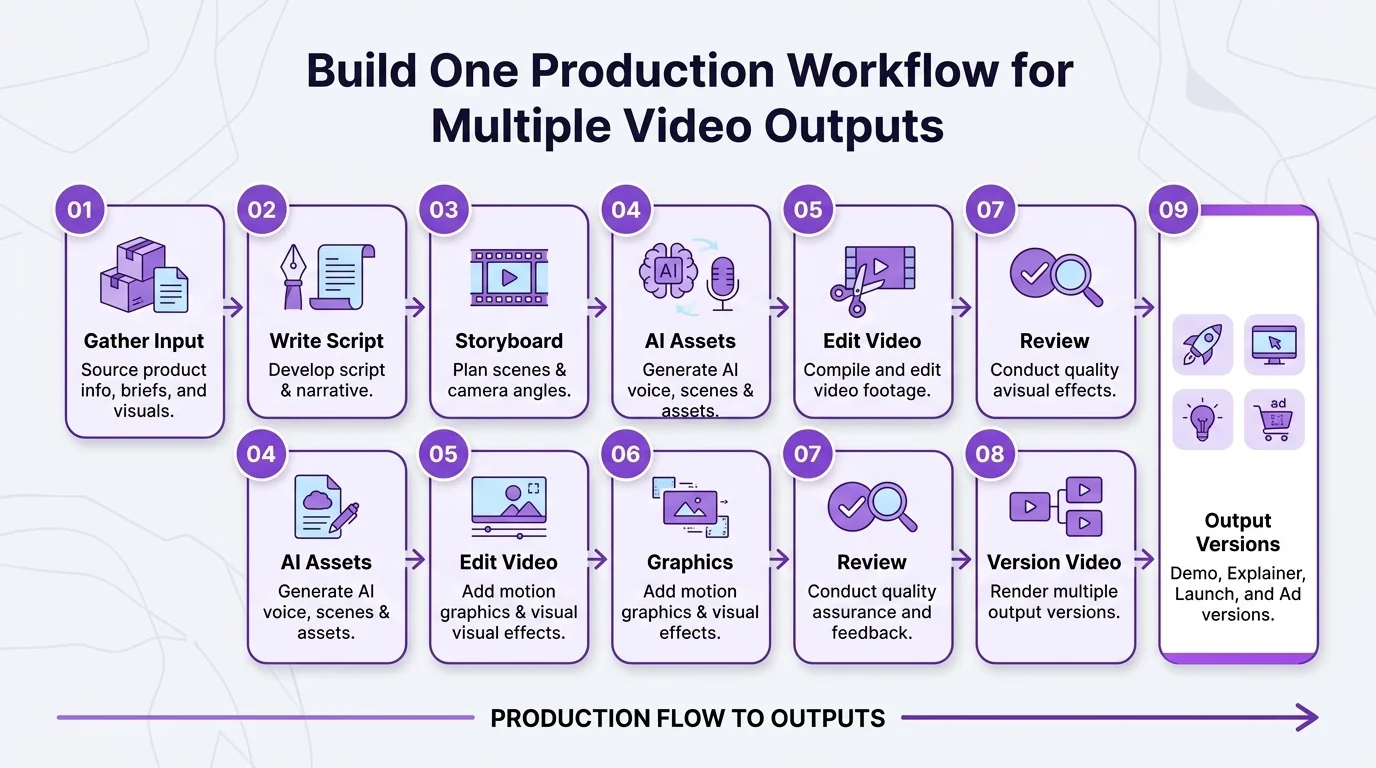
The real value of AI video production for SaaS and B2B isn't only making a video faster. It's taking one body of product knowledge and one creative foundation and turning them into a library of videos that each do a useful job. Wyzowl found that 63% of video marketers have already used AI tools to create or edit videos, up from 51% a year earlier. The teams that get the most from that shift will be the ones that pair the speed with a clear process, which is exactly where our AI services come in.
FAQs
What is AI video production for SaaS?
+
It's the use of AI tools inside a structured production process to script, voice, edit, and adapt videos for software products. Demos, explainers, feature updates, and ads all qualify.
How is a SaaS product demo video different from an explainer video?
+
A demo shows how the product works. An explainer focuses on the bigger picture: what the product is, the problem it solves, and why it matters.
Can AI create a product demo without real screen recordings?
+
It can generate visuals, but that's rarely a good idea for a demo. Buyers want to see the actual interface, and invented screens can mislead them. Use real UI footage for the product itself and save AI-generated scenes for context, concepts, and transitions.
How long should a SaaS video be?
+
In Wyzowl's 2026 survey, 71% of marketers said videos between 30 seconds and two minutes are the most effective. Explainers and ads usually sit in that range, while detailed demos for sales or onboarding can run longer.
Is AI video production cheaper than traditional B2B video production?
+
The biggest savings usually show up in variations and updates rather than the first video. Once the script, visual style, and assets exist, producing a new feature video, audience version, or ad cut takes far less time than a fresh shoot. Total cost still depends on scope, review cycles, and how much custom motion work is involved.

